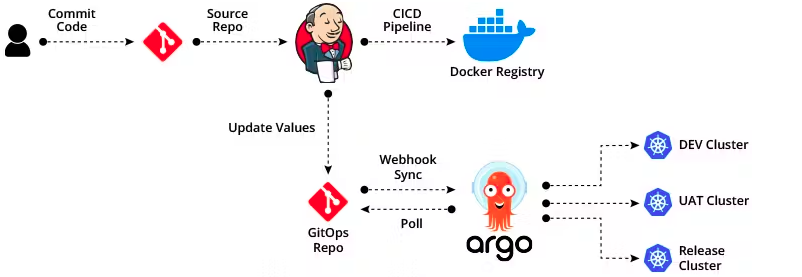
Deploying Argo CD on a Self-Hosted Kubernetes Cluster
Argo CD is a declarative, GitOps continuous delivery tool for Kubernetes. It allows you to manage Kubernetes resources directly from Git repositories. This guide will walk you through deploying Argo CD on a self-hosted Kubernetes cluster.
1. Prerequisites
Before you begin, ensure you have:
- A self-hosted Kubernetes cluster (can be
kubeadm,k3s,microk8s, orkind). kubectlinstalled and configured to access your cluster.Helminstalled (optional if using Helm for Argo CD installation).- Internet access to pull Argo CD images.
2. Create a Namespace for Argo CD
Argo CD should run in its dedicated namespace:
kubectl create namespace argocd
3. Install Argo CD
Option 1: Using kubectl
Apply the official Argo CD manifests:
kubectl apply -n argocd -f https://raw.githubusercontent.com/argoproj/argo-cd/stable/manifests/install.yaml
This will deploy:
argocd-serverargocd-repo-serverargocd-application-controllerargocd-dex-server
Option 2: Using Helm
helm repo add argo https://argoproj.github.io/argo-helm
helm repo update

helm install argocd argo/argo-cd -n argocd --create-namespace
Helm allows easier upgrades and configuration customization.
4. Expose the Argo CD API Server
By default, Argo CD API server is internal. To access it, you can use Port Forwarding for testing or a LoadBalancer/Ingress for production.
Port Forwarding
kubectl port-forward svc/argocd-server -n argocd 8080:443
Open your browser and access: https://localhost:8080
Ingress Example (Nginx)
apiVersion: networking.k8s.io/v1
kind: Ingress
metadata:
  name: argocd-ingress
  namespace: argocd
  annotations:
 nginx.ingress.kubernetes.io/ssl-redirect: "true"
spec:
  rules:
 - host: argocd.yourdomain.com
   http:
 paths:
   - path: /
 pathType: Prefix
 backend:
   service:
 name: argocd-server
 port:
   number: 443
  tls:
 - hosts:
 - argocd.yourdomain.com
   secretName: argocd-tls
5. Access Argo CD UI
Retrieve the initial admin password:
kubectl get secret argocd-initial-admin-secret -n argocd -o jsonpath="{.data.password}" | base64 -d
Login to the Argo CD UI:
- Username:
admin - Password:
<retrieved-password>
6. Deploy Your First Application
Create a Git repository containing Kubernetes manifests or Helm charts.
In Argo CD UI, click New App:
- Application Name: e.g.,
my-app - Project:
default - Repository URL: your Git repo
- Path: path to manifests
- Cluster:
https://kubernetes.default.svc - Namespace: namespace to deploy
- Application Name: e.g.,
Click Create and then Sync to deploy.
7. Optional Configurations
- Enable SSO / OAuth using Dex or GitHub.
- Automatic Sync to keep your cluster in sync with Git.
- RBAC Policies for user access management.
8. Verify Deployment
Check the status of your Argo CD pods:
kubectl get pods -n argocd
Ensure all pods are in Running or Completed state.
Check your deployed application:
kubectl get all -n <application-namespace>
9. Customize Argo CD Configuration and Ingress (Fix Redirects and Domain)
After initial setup, you might need to fix redirect URLs or update your Argo domain (for example, argocd.cloudmateria.com instead of argocd.example.com).
Step 1 — Update Argo CD Base URL
Edit the main Argo CD configuration map:
kubectl -n argocd edit configmap argocd-cm
Add or update the following under data::
data: url: https://argocd.example.com # update this if you create custom domain
Then restart the Argo CD server pods to apply changes:
kubectl rollout restart deployment argocd-server -n argocd
This ensures the correct redirect domain appears when logging out or using OAuth.
Step 2 — Update the Ingress Configuration
If your Argo CD UI is still pointing to the wrong hostname or you want to change how it’s exposed:
kubectl -n argocd edit ingress argocd-server
Adjust the host and annotations as needed. For example:
spec:
  ingressClassName: traefik
  rules:
    - host: argocd.example.com # update this if you create custom domain
      http:
        paths:
          - backend:
              service:
                name: argocd-server
                port:
                  number: 80
            path: /
            pathType: Prefix
Then apply:
kubectl rollout restart deployment argocd-server -n argocd
Verify the change:
kubectl get ingress -n argocd
Now visiting https://argocd.cloudmateria.com should work properly and redirect correctly after logout.
10. Summary
You now have Argo CD running on your self-hosted Kubernetes cluster, fully customized with your own domain.
Argo CD enables:
- Declarative management of Kubernetes resources.
- GitOps-driven continuous delivery.
- Rollback and sync capabilities for rapid recovery.
- Configuration through simple Git commits rather than manual commands.
This setup provides a centralized and automated way to manage your deployments across multiple clusters — your Git repository becomes the single source of truth for the desired state of your applications.