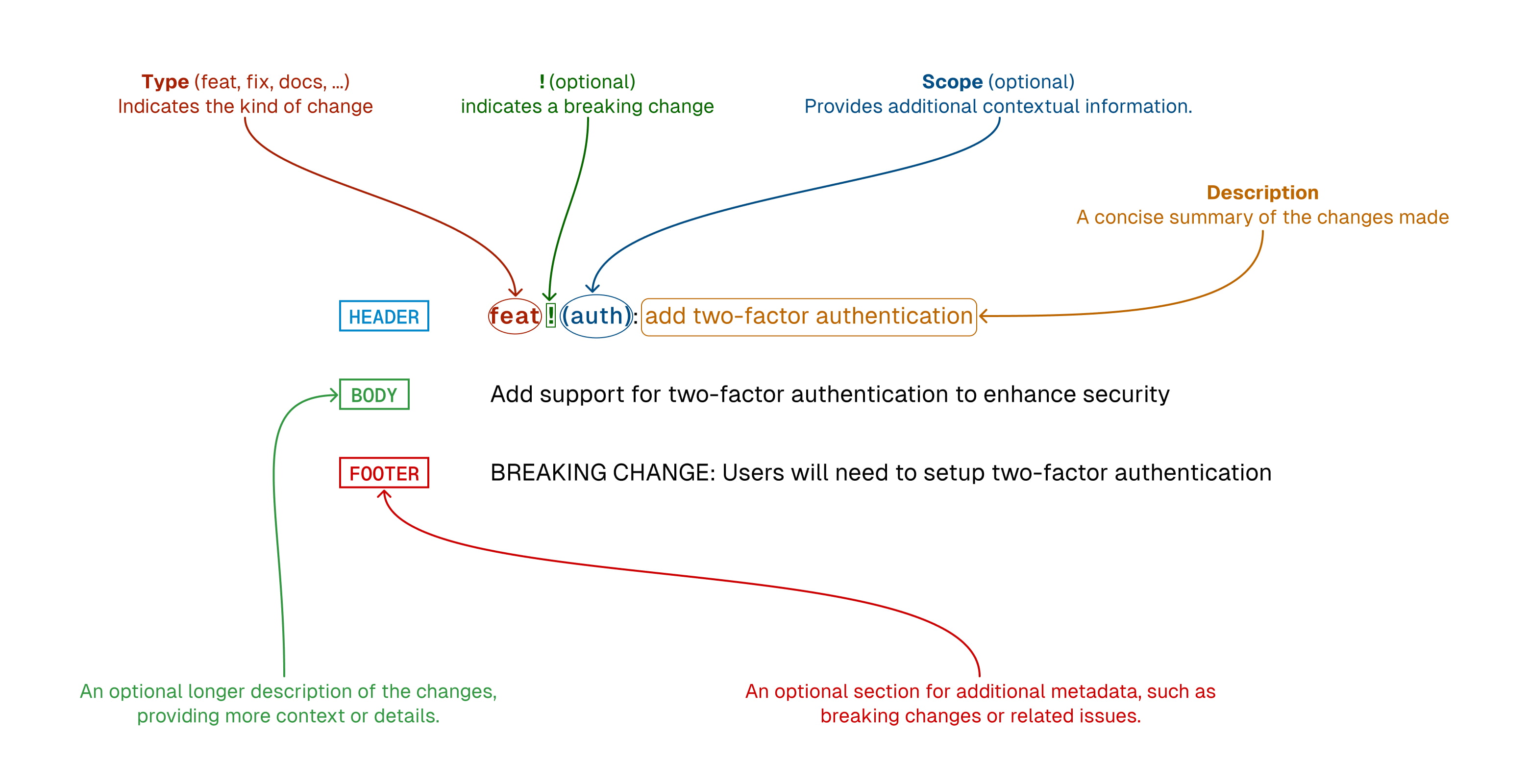
A Step-by-Step Guide to Conventional Commits
What are Conventional Commits?
Conventional Commits is a specification for formatting Git commit messages in a consistent and machine-readable way. By following the Conventional Commit format, you can improve the readability of your commit messages and help automate your release and changelog generation processes. Many tools, such as GitLab, GitHub, and JIRA, support Conventional Commits out of the box, making it easy to incorporate this convention into your workflow.
Step 1: Install a Conventional Commit tool
To get started with Conventional Commits, you'll need to install a tool that supports the convention. One popular option is commitizen, a command-line utility that provides an interactive interface for creating Conventional Commit messages. You can install commitizen globally using npm:
npm install -g commitizen
Step 2: Initialize your repository with commitizen
Once you've installed commitizen, you'll need to initialize your Git repository to use it. To do this, navigate to your repository's root directory in your terminal and run the following command:
commitizen init cz-conventional-changelog --save-dev --save-exact
This will create a .czrc file in your repository's root directory, which tells commitizen to use the Conventional Commits format when creating commit messages.
Step 3: Use Conventional Commits in your workflow
Now that your repository is set up to use Conventional Commits, you can start creating commit messages using the format. Here's an example of a commit message using the fix type:
fix: correct minor typo in README.md
In this example, fix is the commit type, and correct minor typo in README.md is the commit message. The colon after the commit type is required and serves as a separator between the type and message.
Here's a table of the different commit types that Conventional Commits supports, along with their descriptions:
| Commit Type | Description |
|---|---|
| feat | A new feature |
| fix | A bug fix |
| docs | Documentation changes |
| style | Changes that do not affect the meaning of the code (white-space, formatting, missing semi-colons, etc) |
| refactor | A code change that neither fixes a bug nor adds a feature |
| perf | A code change that improves performance |
| test | Adding missing tests or correcting existing tests |
| build | Changes that affect the build system or external dependencies (example scopes: gulp, broccoli, npm) |
| ci | Changes to our CI configuration files and scripts (example scopes: Travis, Circle, BrowserStack, SauceLabs) |
| chore | Other changes that don't modify src or test files |
| revert | Reverts a previous commit |
By using these commit types in your commit messages, you can provide additional context about the changes you've made to your codebase.
Conclusion
By following the Conventional Commits specification, you can create more consistent, readable, and machine-readable Git commit messages. This can help streamline your development workflow and make it easier to generate release notes and changelogs. With the help of a tool like commitizen, getting started with Conventional Commit