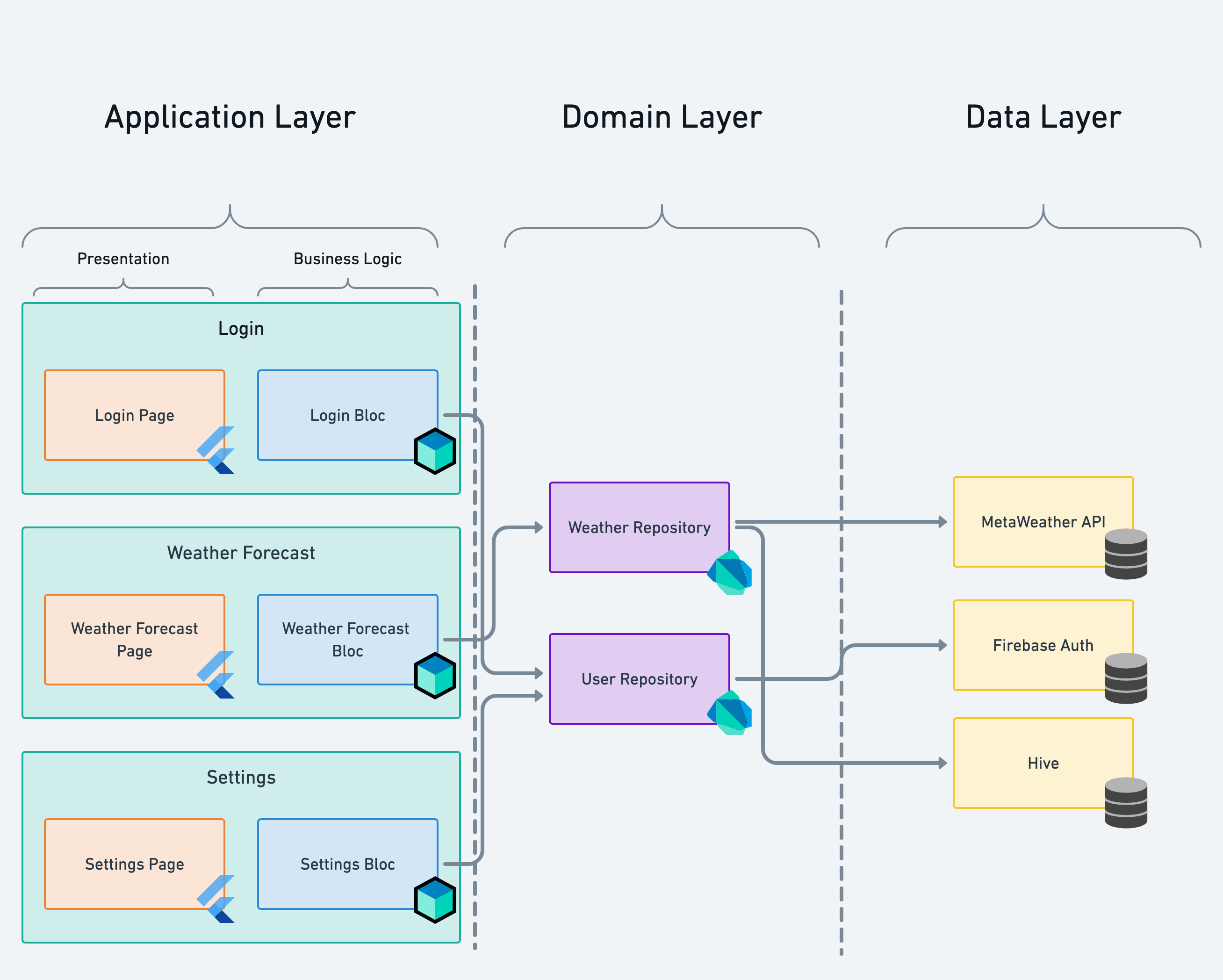
Codebase Architecture Upscaling Guide: From Simple Scripts to Scalable Systems
As a software project evolves, its structure must evolve too. What begins as a single-file prototype can grow into a sprawling ecosystem of interconnected services. This guide walks through the journey of upscaling a codebase — from simple beginnings to sophisticated, enterprise-level architectures.
1. Script / Spaghetti Code
Use Case: Quick prototypes and automation scripts.
All logic is in one file, great for testing ideas but terrible for scaling.
Example:
app.py
Pros: Simple, fast to write. Cons: Unmaintainable, no separation of concerns.
2. Procedural Organization
Use Case: Small tools with a few clear responsibilities.
Logic is grouped into files by topic.
Example Structure:
src/
 ├── math_utils.py
 ├── file_ops.py
 └── main.py
Pros: Better organization, clearer purpose per file. Cons: Functions still share global context, testing and scaling are limited.
3. MVC (Model-View-Controller)
Use Case: Small to medium web applications.
Separates responsibilities between data (Model), presentation (View), and logic (Controller).
Example Structure:
src/
 ├── models/
 ├── views/
 ├── controllers/
 └── app.js
Pros: Encourages separation of concerns, works well for CRUD apps. Cons: Controllers can grow too large as logic expands.
4. Layered Architecture
Use Case: Monolithic systems that need clean separation.
Adds explicit layers for services, repositories, and entities. Each layer has a single responsibility.
Example Structure:
src/
 ├── controllers/
 ├── services/
 ├── repositories/
 ├── entities/
 └── main.ts
Pros: Modular and testable; code reuse improves dramatically. Cons: More boilerplate; enforcing boundaries takes discipline.
5. Clean Architecture (Hexagonal / Onion)
Use Case: Large-scale systems that must adapt easily.
Frameworks and tools live on the outer layer. Core business logic stays pure in the center.
Example Structure:
src/
 ├── domain/
 │    ├── entities/
 │    ├── value_objects/
 │    └── repositories/
 ├── usecases/
 ├── infrastructure/
 │    ├── db/
 │    ├── api/
 │    └── mappers/
 ├── adapters/
 └── main.ts
Pros: Independent of frameworks, highly testable. Cons: Verbose and complex to set up correctly.
6. Domain-Driven Design (DDD)
Use Case: Enterprise systems with rich business rules.
Organizes the system by domain — not by technical layer — to mirror real-world business structure.
Example Structure:
src/
 ├── features/
 │    ├── users/
 │    │    ├── domain/
 │    │    ├── application/
 │    │    └── infrastructure/
 │    └── payments/
 ├── shared/
 │    ├── kernel/
 │    ├── utils/
 │    └── constants/
 └── main.ts
Pros: Encapsulates logic per business domain, scales across large teams. Cons: Steep learning curve; more structure than smaller apps need.
7. Microservices Architecture
Use Case: Systems that need independent scaling and deployment.
Breaks the monolith into smaller services, each handling one domain.
Example Structure:
user-service/
 ├── src/
 ├── tests/
 └── Dockerfile

order-service/
 ├── src/
 ├── tests/
 └── Dockerfile

gateway/
 └── src/
Pros: Independent deployments, fault isolation, clear ownership. Cons: Complex operations, monitoring, and inter-service communication.
8. Event-Driven Architecture (EDA)
Use Case: Real-time and high-scale distributed systems.
Services emit and react to events instead of calling each other directly.
Example Structure:
services/
 ├── user/
 ├── order/
 ├── payment/
 └── events/
      ├── user_created.ts
      ├── order_placed.ts
      └── payment_completed.ts
Pros: Decoupled, fault-tolerant, and scalable. Cons: Debugging event chains and tracing logic flow can be difficult.
9. Monorepo with Modular Packages
Use Case: Unified development for multiple products or platforms.
One repository, many modules. Simplifies version control and dependency sharing.
Example Structure:
packages/
 ├── backend/
 ├── frontend/
 ├── shared/
 ├── types/
 └── config/
Pros: Shared utilities, unified tooling, simplified collaboration. Cons: Requires disciplined CI/CD and build strategies.
10. Micro-Frontends and Polyrepo Systems
Use Case: Huge organizations with multiple frontend teams.
Each UI section is an independent app, composed at runtime for flexibility.
Example Structure:
apps/
 ├── dashboard/
 ├── authentication/
 ├── ads/
 └── shell/
Pros: Parallel team development, independent deployments. Cons: Integration and routing complexity, performance trade-offs.
Summary Table
| Level | Architecture | Scale | Core Benefit |
|---|---|---|---|
| 1 | Script | Tiny | Rapid prototyping |
| 2 | Procedural | Small | Basic modularity |
| 3 | MVC | Small-Medium | UI and logic separation |
| 4 | Layered | Medium | Reusable, testable logic |
| 5 | Clean Architecture | Large | Framework-independent design |
| 6 | DDD | Enterprise | Business-aligned structure |
| 7 | Microservices | Enterprise | Independent scalability |
| 8 | Event-Driven | Massive | Reactive, resilient workflows |
| 9 | Monorepo | Multi-product | Shared code and versioning |
| 10 | Micro-Frontend | Massive | Decentralized UI scalability |
Final Thought
Scaling a codebase isn’t just about writing more code — it’s about structuring knowledge. Each architectural step adds a layer of abstraction, discipline, and flexibility. As systems evolve, your architecture should mature alongside them, ensuring that growth never turns into chaos. A truly senior engineer builds not only for today’s features, but for tomorrow’s scale.